 CocosEditor
01 / UI
Position & size adjustment
Fine-tune exposed layout properties and see the result in the running game.
Runtime Editor for Cocos2d-x
CocosEditor
Inspect. Edit. Debug.
While your game is running.
CocosEditor is a runtime editor and debugging tool for Cocos2d-x. Make UI adjustments and diagnose runtime problems without repeatedly rebuilding or restarting the game.
Windows x86 / x64 editor · Runtime SDK integration required
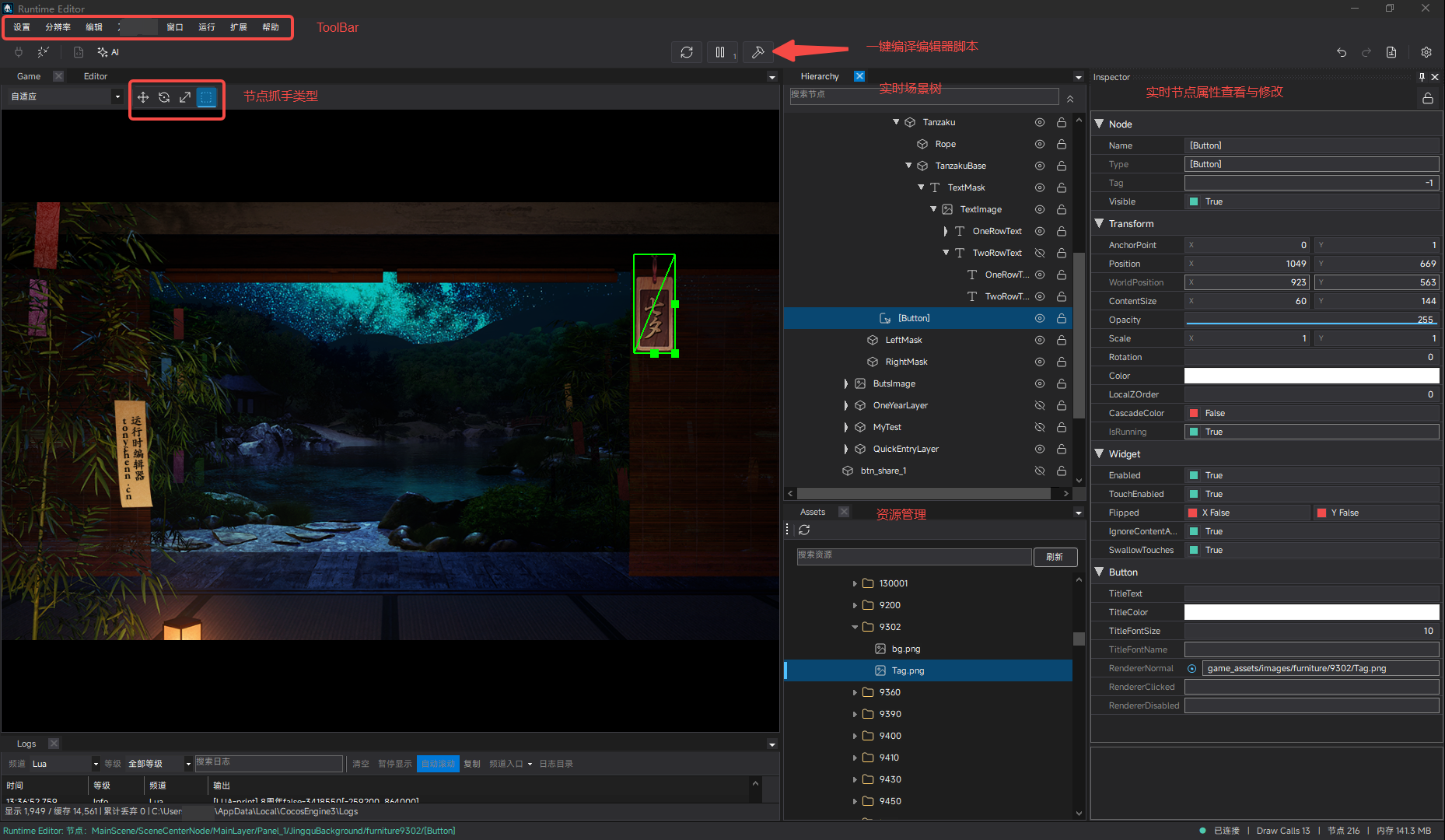
Connect it to a running game to inspect the live scene hierarchy, select nodes, edit component properties in real time, browse assets, inspect logs, and expose runtime capabilities to AI tools through MCP.
Why CocosEditor
A small UI adjustment should not send you through the whole development loop again. Connect to the game you already have running and work with its actual state.
The usual iteration loop
Repeat the setup for every position, size, or visibility adjustment.
With CocosEditor
Get immediate feedback on supported properties in the current session.
01 / Live Hierarchy
Explore the actual node hierarchy of the running game.
Find UI nodes, follow parent-child relationships, and investigate unexpected nesting or draw order. See the current Cocos2d-x hierarchy directly instead of inferring it from code.
Select a node in Game or Hierarchy and inspect the same selection in Inspector.
02 / Runtime Inspector
Select a node and inspect or modify supported component properties while the game is running.
Use the Cocos2d-x inspector to adjust exposed values such as position, size, scale, visibility, color, and text. Supported edits apply to the live node and are reflected in Game.
Runtime edits affect the current session. They do not automatically save back to your source code or CSB/CSD files.
03 / Runtime Debugging
A focused Cocos2d-x debugging tool for everyday development. Use it as a Cocos2d-x UI editor during a running session and correlate the screen, nodes, properties, resources, and logs.
01 / UI
Fine-tune exposed layout properties and see the result in the running game.
02 / HIERARCHY
Find live nodes and trace the parent-child relationships behind the screen.
03 / INSPECTOR
Inspect the selected node and edit the properties exposed by its runtime integration.
04 / STATE
Check live visibility, transforms, and supported values when the game behaves unexpectedly.
05 / ASSETS
Browse and find project resources in the Assets panel alongside the Game view.
06 / LOGS
Follow editor and runtime output with search, channel filters, and severity filters.
04 / MCP & AI Integration
CocosEditor exposes runtime capabilities through MCP, allowing compatible AI clients and development tools to inspect and interact with the running game.
Use Cocos2d-x MCP tools to locate nodes, inspect supported properties, and assist with Cocos2d-x runtime debugging. Available operations depend on the connected runtime and its advertised capabilities.
How It Works
Integrate the SDK, configure the game path in CocosEditor, and mount the game to use Hierarchy, Inspector, Logs, and supported MCP capabilities.
Use a version-matched SDK and the guide for your target platform. Native integration is required for both C++ and Lua projects.
Open CocosEditor and set the path for your SDK-integrated game.
Mount the configured game from CocosEditor, then inspect live nodes, edit supported properties, and view logs.
Supported Environment
The desktop editor and the game runtime have separate requirements. Check SDK compatibility before integrating.
Get CocosEditor
There is no public installation package yet. Contact the author by email to request the Windows x86 or x64 editor and a version-matched Runtime SDK.
Windows x86 / x64 · Contact by email for accessInclude your Cocos2d-x version, whether your project uses C++ or Lua, and your game's target platform and architecture.
Ask about package availability and SDK compatibility for your project. GitHub remains the home for technical documentation, issue tracking, and version history.
FAQ
A runtime view of your game, with a clear boundary between live edits and your project files.
CocosEditor is a runtime editor and debugging tool for Cocos2d-x. It connects to an SDK-integrated game to inspect the live hierarchy, edit supported component properties, browse assets, inspect logs, and expose supported runtime capabilities through MCP.
Initial Runtime SDK integration requires native project configuration and lifecycle integration. Once connected, Hierarchy and Inspector operate on the running game's state. Runtime property edits do not automatically rewrite your project source or scene resource files.
Yes. The game must integrate the CocosEditor Runtime SDK for its target platform, with a version matching the editor. This requirement applies to C++ and Lua projects.
Runtime changes are not automatically written back to Cocos2d-x project source code, CSB files, CSD files, or other scene resources. Treat Inspector edits as changes to the current running session. Apply the final values in your own code or resource authoring workflow when you want them to persist.
Yes, for compatible Cocos2d-x projects with native Runtime SDK integration. You can inspect live Cocos nodes and supported component properties, including nodes created by Lua. This is not a promise of arbitrary Lua variable inspection or a full Lua source debugger.
MCP stands for Model Context Protocol. CocosEditor exposes tools that compatible AI clients can use to inspect and interact with the connected runtime. It assists development and debugging; available tools depend on the runtime's supported capabilities. See the MCP API reference for configuration and operation details.
There is no public installation package yet. Email email@tonychenn.cn or gogle.huiy@gmail.com to request the editor and a version-matched Runtime SDK. Include your engine version, project language, and target platform.
Use of CocosEditor and its SDKs is governed by the license terms or end-user license agreement included with each release. Review those terms before use. The GitHub repository distributes releases and documentation; it is not an open-source repository for the editor's source code.